How Much RAM and Storage Do You Actually Need in a Xiaomi Phone?
8GB or 12GB of RAM? 256GB or 512GB of storage? A practical guide for Xiaomi, Redmi and POCO buyers, with a quick-reference table and answers to the most common questions.
Phone makers love big numbers. A Xiaomi flagship with 16GB of RAM and 1TB of storage sounds better than one with 8GB and 256GB, and it costs a lot more. But for most people, the extra memory never gets used, while the extra price is very real.
This guide explains what RAM and storage actually do on a Xiaomi, Redmi or POCO phone, how much you need depending on how you use it, and where it makes sense to spend more. There’s a quick reference table in the middle and answers to the most common questions at the end.
RAM and Storage Are Not the Same Thing
These two specs get confused all the time, so it helps to separate them.
- RAM is short-term working memory. It holds the apps you’re using right now, and the ones you’ve recently switched away from, so they can reopen instantly instead of starting from scratch. When you turn the phone off, it’s emptied.
- Storage is long-term memory. It holds the system, your apps, photos, videos, music and files. It stays when the phone is off.
Running out of RAM makes the phone reload apps more often. Running out of storage stops you from installing apps, updating, or taking photos. They’re different problems with different fixes.
What RAM Really Does for You
More RAM does not make a phone faster at everyday tasks. Scrolling, typing, calls and photos depend mostly on the processor and on how well the software is optimised. What RAM changes is how many things the phone can keep ready at once.
You’ll notice the difference when you jump between many apps, keep a heavy game in the background while you answer a message, or use a split screen or floating window. With too little RAM, the system closes background apps to make room, and they restart when you return to them. It’s an annoyance, not a failure, and for many people it never happens.
One caveat: the amount of RAM listed on the box isn’t all available to you. The system uses a part of it. That’s one reason 4GB phones feel tight today, while 8GB phones rarely do.
How Much RAM and Storage Do You Need? A Quick Reference
These are practical starting points, not strict rules. They assume you want the phone to feel good for a few years.
| How you use your phone | RAM | Storage | Why |
|---|---|---|---|
| Basic: calls, messaging, social media, streaming | 6GB to 8GB | 128GB | Light use doesn’t need much memory, and cloud services cover photos and music. |
| Everyday: many apps, lots of photos, some games | 8GB to 12GB | 256GB | The best balance of price and longevity for most people. |
| Gaming: demanding 3D games kept installed | 12GB or more | 256GB to 512GB | Big games take many gigabytes each, and more RAM helps them stay loaded. |
| Creators: 4K video, large files, editing on the phone | 12GB to 16GB | 512GB to 1TB | High-quality video fills storage fast. |
| Keeping the phone 5 years or more | One tier up from the above | One tier up from the above | Apps get heavier every year, and you can’t upgrade later. |
If you’re torn between two tiers, the storage choice is usually the more important one. You can work around limited RAM with habits, but you can’t add storage later on most phones.
Storage: Where the Space Actually Goes
A 256GB phone doesn’t give you 256GB. The operating system, preinstalled apps and system files take a share, often tens of gigabytes depending on the phone and software version. The usable figure shows in the storage settings.
Beyond that, the biggest consumers are usually:
- Photos and video. High-resolution photos and especially 4K video add up quickly. A few minutes of 4K footage can take over a gigabyte.
- Games. Popular 3D titles often take several gigabytes each, and they grow with updates.
- Messaging apps. Chat apps quietly store every photo, video and voice note you receive.
- Offline content. Downloaded maps, music and streaming videos.
Unwanted preinstalled apps also use space and memory. If your phone feels crowded, our guide to removing bloatware on HyperOS shows how to clear them.
Storage Speed Matters Too
Capacity isn’t the only spec. Phones use different storage types, and faster ones, such as newer UFS versions, load apps and games more quickly and save large files faster. Two phones with the same 256GB can feel different for this reason. Flagships usually have the faster types, while some budget models use slower ones. If a spec sheet names the storage standard, it’s worth comparing.
Does Xiaomi’s Memory Extension Help?
Many Xiaomi phones offer a memory extension feature, sometimes called virtual RAM, that lets the phone use part of its storage as extra memory. You can usually find it in the settings under additional settings, though the path can vary by model and software version.
It can help a phone with limited RAM keep a few more apps open, but storage is much slower than real RAM, so it’s not a substitute for buying more. Think of it as a small safety net. It also uses up storage, which matters if you’re already short of space.
Should You Pay More for Higher Tiers?
Manufacturers usually charge a lot for each step up. Before paying for it, ask what you’re really buying:
- Moving from 128GB to 256GB is often worth it if you take many photos or install games.
- Moving from 8GB to 12GB of RAM matters for heavy multitaskers and gamers, not for most people.
- Moving to 1TB only makes sense if you store a lot of video locally and don’t use cloud services.
Prices and available configurations differ by region and change often, so compare the actual price gap between versions of the exact phone you’re considering.
Five Mistakes to Avoid When Choosing
- Chasing RAM while ignoring the processor. A phone with a weak chip and a lot of RAM won’t feel fast. The processor decides how smooth everyday use feels.
- Buying the lowest storage tier “because of the cloud”. Cloud services help, but they need a good connection and a monthly fee once the free space runs out.
- Judging by the number on the box alone. Marketing sometimes adds virtual RAM to the headline figure. Look for the physical RAM in the specifications.
- Forgetting how long you’ll keep it. If you replace your phone every two years, a mid tier is fine. If you keep it for five, the extra memory pays off.
- Ignoring the software. Preinstalled apps and aggressive background settings can make a phone with plenty of memory feel cramped. A little cleaning often helps more than a bigger tier.
How to Check What You’re Using Right Now
If you already own a Xiaomi, you can find out whether you really need more before you buy. In the storage section of the settings, the phone shows how much space is used and by what: apps, photos, videos and system files. If more than half is free after a few months of normal use, the next phone in the same tier will probably serve you fine. If you’re constantly deleting things to make room, step up a tier.
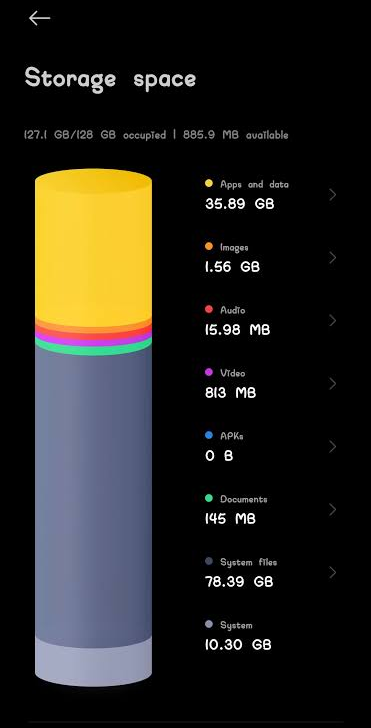
For RAM, pay attention to how the phone behaves rather than to a number. If apps rarely reload when you switch back to them, you have enough. If you often lose your place in apps you left a minute ago, check the battery and autostart settings first, and consider more RAM only if the problem remains.
Frequently Asked Questions
Yes, for most people. 8GB handles everyday apps, social media, streaming and casual gaming comfortably. You only start to feel limits if you constantly switch between heavy apps or play demanding games while keeping many apps open.
It helps a little. It lets the phone use some storage as extra memory so more apps can stay open, but storage is much slower than real RAM. It’s a safety net, not a replacement for physical RAM, and it uses up some of your storage.
Choose 256GB if you take a normal number of photos, use cloud backup and install a few games. Choose 512GB if you record a lot of 4K video, keep large games installed, or plan to keep the phone for five years or more.
Most of the time it’s the software’s memory and battery management, not a lack of RAM. Settings such as battery optimisation and autostart permissions can stop apps from staying active. Checking those settings for the app in question often fixes it.
It depends on the model. Some budget Redmi phones include a microSD slot, but most flagships don’t, so check the specifications of your exact phone. If yours has no slot, cloud storage or a USB-C drive are the usual alternatives.
The Bottom Line
For most people, 8GB of RAM and 256GB of storage is the sweet spot on a Xiaomi, Redmi or POCO phone. Go lower if your use is basic and you rely on the cloud. Go higher only if you game seriously, shoot lots of 4K video, or want a phone that lasts five years or more. When in doubt, spend on storage first, because it’s the one thing you can’t fix later.