Xiaomi Charging Cable Guide: Speed & Battery Life Boost
charging cable Xiaomi. # The Ultimate Guide: How Your Charging Cable Impacts Xiaomi, Redmi & POCO Battery Life
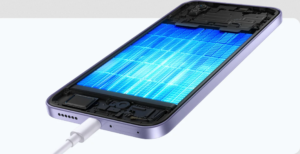
Is your Redmi Note 14 Pro taking ages to charge, even with the original charger? Is your POCO X7 battery draining faster than it should? The culprit might be the silent villain: your charging cable. In Xiaomi devices boasting rapid charging at 67W, 120W, or even a whopping 210W (think the rumored Xiaomi 15 Ultra or Redmi K80 Pro), using the wrong cable can slash charging speeds by up to 60% and accelerate battery degradation. This guide dives deep into how to choose the perfect cable and optimize charging on HyperOS 3 for your Xiaomi, Redmi and POCO device.

Why Your Cable Matters More Than You Think
We often focus on the charger, but the cable is just as critical. The charger negotiates the power output (voltage x amperage), but the cable is the physical channel through which that power flows. A weak cable acts as a bottleneck, causing several issues:
- Limited Current Flow: A cable designed for low amperage won’t be able to handle the demands of fast charging. Your 120W charging could be throttled down to a mere 18W.
- Excessive Heat Generation: Restricted current flow leads to increased resistance within the cable, generating excess heat. This heat directly impacts your battery, accelerating degradation and shortening its lifespan (reducing useful charge cycles).
- Voltage Drops: A poor-quality cable can cause significant voltage drops. Your phone might “think” it’s charging slower than it actually is because the voltage reaching the battery is lower than expected.
Consider this real-world example: Using a generic USB-A cable with a POCO F6 (designed for 90W charging) might only deliver around 15W. Swap it for the original 6A cable, and you could see speeds jump to 80W or higher! It is important that you use the original cable, or a Xiaomi certified cable for the fast charging to work.

120W charging
Understanding Cable Types for Xiaomi, Redmi & POCO Devices
Here’s a breakdown of different cable types and their compatibility with your Xiaomi, Redmi, or POCO phone:
| Cable | Gauge (AWG) | Max Amperage | Compatible With | Real-World Speed (67W+) | Lifespan |
|---|---|---|---|---|---|
| 5A/6A Original Xiaomi | 22-24 AWG | 6A | 67W-210W | 100% | 10,000+ cycles |
| USB-C 3A Generic | 28 AWG | 3A | Up to 18W | 25-40% | 2,000 cycles |
| 100W PD (e-Mark) | 24 AWG | 5A | 33W-67W | 80-90% | 8,000 cycles |
| C to Lightning MFi (Apple) | 26 AWG | 2.4A | Data Only | No Fast Charging | — |
For optimal performance with your Redmi Turbo 4 Pro (120W) or other fast-charging devices, we recommend using the Xiaomi 6A cable (available in 1m or 2m lengths) or a Baseus 240W e-Mark cable. You can even find great deals during the Xiaomi Double 11 sales.

Mirada en profundidad a charging cable Xiaomi
Quick Checks: How to Identify a High-Quality Cable
Before you buy, run these three quick checks to ensure you’re getting a decent cable:
- E-Mark Chip (for >60W): Look for the E-Mark logo (a small “E” inside a rectangle) on the connector. This chip ensures the cable can safely handle higher power delivery.
- Cable Thickness: A thicker cable generally means better conductivity. Aim for a diameter greater than 4.5mm.
- Certification: Check the packaging for clear indications like “Supports 120W” or “HyperCharge.”
HyperOS Tip: Optimize Charging for Battery Health
To further extend your battery’s lifespan, activate the “Optimized Charging” feature within HyperOS (Settings > Battery). This setting intelligently limits charging to 80%, reducing thermal stress and slowing down degradation. It is a great feature that many Xiaomi Smartphone users should enable.
Common Mistakes That Damage Your Battery
Even with a good cable, certain habits can negatively impact your battery’s health. Avoid these common errors:
| Error | Consequence | Solution |
|---|---|---|
| Using a damaged cable | Overheating | Inspect for bends every 3 months |
| Charging with thick case | +10°C battery temp | Remove the case |
| Cable >2m with 120W | 30% power loss | Use cables ≤1.5m |
It is also important to note, as reported in Xiaomi news, that you should never leave your Xiaomi, Redmi or POCO plugged in for extended periods of time after it has reached 100%.

Redmi
Cable Maintenance for Maximum Lifespan
Extend the life of your charging cables with these simple maintenance tips:
- Clean the Port: Clean your phone’s charging port every couple of months using a cotton swab lightly dampened with isopropyl alcohol. This removes dust and debris that can hinder proper contact.
- Proper Storage: When storing cables, coil them in a figure-eight (“8”) shape rather than tight circles. This prevents internal wire damage.
- Use Original Chargers: Avoid cheap, unbranded chargers, especially those claiming to deliver high wattage. Stick to original Xiaomi chargers or reputable brands. Be wary of counterfeit “33W” chargers that sell for next to nothing – they could damage your device.
The Benefits of HyperOS
The optimized battery charging is just one of the many benefits of having a phone that runs on HyperOS, Xiaomi’s advanced operating system. HyperOS allows for better power management for your device. Learn more about the upcoming HyperOS 3 with its potential Android 16 integration.

Mirada en profundidad a charging cable Xiaomi
Invest a Little, Gain Years of Battery Life
Spending just $8-12 on an original Xiaomi 6A cable ensures your POCO X7 Pro receives the full 120W charging it’s designed for. Replacing your cable every 12-18 months, or after approximately 5,000 charging cycles, is a worthwhile investment. This can translate to significantly faster charging times (a full charge in just 19 minutes on a Redmi Note 14 Pro+) and a healthier battery (retaining around 85% of its capacity after 500 cycles). Don’t neglect the importance of this simple yet crucial accessory for your Xiaomi, Redmi, or POCO device! What cable are you currently using with your Xiaomi phone? Share your model and charging speeds in the comments below! And if this guide helped you save your battery, don’t forget to share it with your friends!

2 thoughts on “Xiaomi Charging Cable Guide: Speed & Battery Life Boost”